Flies Multi-Task Challenge Arcade
Reviews
Description
Game Introduction
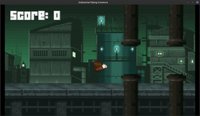
Flies Multi-Task Challenge is an online arcade game where you guide multiple flies through obstacle-filled levels. The core objective is to manage all flies simultaneously, navigating them past hazards and toward goals. This game stands out for its focus on multitasking and coordination, offering a fun, family-friendly experience. With physics-based movement and gravity effects, each fly's path requires careful timing. The game is designed for quick sessions, typically lasting around five minutes, making it ideal for casual play. Its lighthearted tone and absence of violent content ensure a safe environment for players of all ages.
How to Play
Players use keyboard controls to manage the flies. Typically, you press keys to flap each fly's wings—for example, one key for the left wing and another for the right wing—to keep them airborne and move them forward. Additional keys allow you to grab and release objects to interact with the environment. The goal is to guide all flies through each level by avoiding obstacles and completing tasks. Success requires focus and timing, as you must coordinate multiple flies at once. Practice helps improve your speed and endurance, making the challenge progressively more manageable.
Game Features
This game includes physics-based movement and gravity mechanics that affect fly behavior. It features funny, lighthearted visuals and good background music to enhance the experience. The action is quick-paced, with levels designed to be completed in short sessions (around five minutes). Controls are keyboard-only, making it easy to learn and play on most devices. The game may include multiple levels with increasing difficulty, testing your multitasking abilities. Its family-friendly design ensures no violent or inappropriate content, focusing instead on coordination and quick thinking.
Tips for Success
To excel, practice coordinating all flies at once—start by focusing on one or two, then gradually add more. Learn the timing of wing flaps to maintain stable flight, especially in areas with strong gravity or obstacles. Use object interaction keys wisely to clear paths or solve puzzles. Stay calm and patient; multitasking improves with repetition. Take note of level layouts to anticipate hazards. Finally, take short breaks between attempts to maintain focus, as the game requires sustained attention. Regular practice will boost your speed and accuracy over time.