Tactical Strategy Commander
Reviews
Description
Building an Army on a Budget
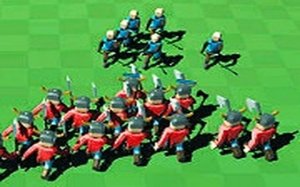
Every match in Tactical Strategy Commander starts with a fixed budget. Before placing a single soldier, you decide how to split that budget between unit quality and unit quantity. A smaller group of stronger units plays differently from a larger group of cheaper ones, and the game expects you to weigh that trade-off each time. Because the enemy army scales in difficulty as you progress, a spending plan that wins one map may leave you short on troops for the next.
Placement and Map Control
Once your force is hired, the battlefield becomes a positioning puzzle. You navigate the map with the mouse or the W, A, S, D keys, then left-click to place soldiers where they gain a tactical advantage. Terrain matters: high ground, chokepoints, and open flanks change how much value each unit delivers. The goal is not to overwhelm the enemy but to outmaneuver them, which means reading the map before committing your placements.
Reading Enemy Patterns
Enemy armies grow more challenging as you advance, and each level introduces new obstacles. Studying how the enemy deploys and moves lets you adapt your own formation instead of repeating the same layout. This is where the game's strategic depth sits: patience and forward planning matter more than fast clicking. Players who think several moves ahead tend to handle later levels more comfortably than those who react on the spot.
Accessibility and Audience
Controls are intentionally simple, and the game avoids graphic content, focusing on mental challenge rather than spectacle. That combination makes it approachable for beginners while still offering enough tactical depth for experienced strategy players. If you enjoy resource management, unit placement, and methodical problem-solving in a single-player format, this fits that profile well.
Compatibility
Faq
Comments
Sign in to comment
You must be logged in before posting a review or rating.
No comments yet. Be the first to comment!








Editorial Notes