← Back to Games
Calm Roads Driving Journey
Developer: Sprite Interactive
Published: 2026-09-30
Updated: 2026-09-30
Loading Game Image...
Reviews
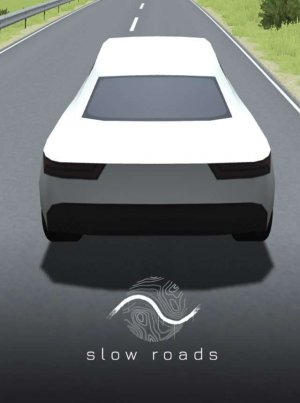
Calm Roads Driving Journey is honest about its scope: it offers driving for its own sake, not racing or challenges. The procedural world and control over weather and time give it a meditative quality that suits players who enjoy low-stakes exploration. The low-poly visuals and autopilot option reinforce that intent. Its limitation is equally clear: anyone seeking goals, opponents, or progression systems will find none here. It succeeds as a quiet sandbox for solo drivers.
Description
An Open Road Without Pressure
Calm Roads Driving Journey removes the usual racing framework of timers, opponents, and scoreboards. The only objective is to drive and observe the landscape. Because the world is procedurally generated, new roads and scenery appear as you continue, so the route never depends on memorizing a fixed track. The low-poly art style keeps the visual field simple and calm, which supports the unhurried pace. [IMG_1]Driving Controls and Vehicle Behavior
On a computer, steering uses W, A, S, D or the arrow keys. Shift provides a speed boost, and C cycles through camera views. Q and E change weather and time of day, while R resets the vehicle if it becomes stuck. F activates autopilot for hands-free driving. Mobile players use touch controls for the same actions. Drivetrain customization changes handling characteristics, giving each vehicle a different feel on the road.Environmental Control and Mood
Weather and time of day are fully adjustable, so the atmosphere can shift from clear daylight to rain or dusk without leaving the game. This control pairs with the procedural terrain, which includes hills, forests, deserts, and coastlines. Multiple vehicle types add variety in speed and handling, letting you choose a driving style that matches the mood you want. [IMG_2]Playing at Your Own Pace
With no competition or fail states, progress is personal. Autopilot is useful when you prefer to watch the landscape rather than steer. Camera angles and weather settings can be experimented with to find a preferred driving condition. If the vehicle gets stuck, the reset function returns you to the road immediately, so exploration continues without frustration.Compatibility
✅ Works on PC & Mobile | Recommended: Chrome / Safari / Edge
Faq
Does Calm Roads Driving Journey have any goals or win conditions?
No. The game is built around relaxed driving rather than objectives. There are no timers, opponents, or scores to chase. The only activity is driving through the generated world and adjusting the environment to suit your mood. Progress is whatever distance or scenery you choose to experience.
Can I play Calm Roads Driving Journey with friends or online?
The game is designed for a single player. The original description lists Single Player as its only tag and describes a solitary experience. There is no mention of multiplayer, co-op, or online features, so the game should be treated as a solo activity only.
What platforms are supported for Calm Roads Driving Journey?
The input describes computer controls using keyboard keys and also mentions mobile devices with touch controls. That indicates the game is intended for both desktop and mobile play. Specific storefronts or operating system requirements are not stated in the available information.
How does the procedural generation work in Calm Roads Driving Journey?
The world generates new roads as you drive, so the landscape is not a fixed map. Terrain types include hills, forests, deserts, and coastlines. Because generation continues during play, each session can produce different scenery. The game does not describe a limit to how far the world extends.
Is there a way to drive without steering in Calm Roads Driving Journey?
Yes. Pressing the F key activates autopilot, which lets the vehicle drive itself while you watch the surroundings. This is useful when you want a hands-free experience or prefer to observe the landscape rather than control the car. Autopilot can be turned off to resume manual driving.
What should I do if my vehicle gets stuck in Calm Roads Driving Journey?
Press the R key to reset your vehicle. This returns the car to a drivable position so you can continue without restarting the game. The reset function is available on computer, and mobile controls provide an equivalent action. It is intended to keep exploration smooth rather than punish mistakes.
Comments
Sign in to comment
You must be logged in before posting a review or rating.
No comments yet. Be the first to comment!







Editorial Notes